| .github/workflows | ||
| docs | ||
| asn-gen.py | ||
| AveryLabels.py | ||
| LICENSE | ||
| README.md | ||
| requirements.txt | ||

ASN Label Generator
This is a tool to create ASN Labels to use for document management systems such as Paperless-ngx. The recommended workflow of Paperless-ngx uses QR codes for ASN (archive serial number) labels.

This Python based CLI tool outputs a PDF for printing on the label sheets.
Features
Besides generating ASN labels with a QR Code the tool can also
-
combine multiple labels on one physical label on the sheet
This is helpful for small label sizes even though your physical label cutout sizes are bigger. -
support custom number ranges
This can be useful if you want to use different folders and number ranges for yourself (ASN00001), your partner ASN20001, your kids (ASN40001), etc. -
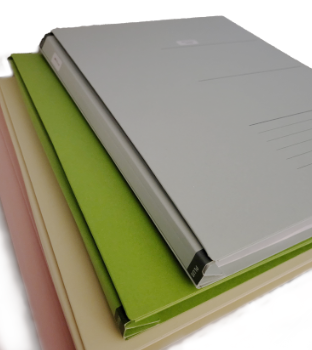
add a color bar to the side of the labels to allow easier visual identification where the label belongs to
I use expandable folders with different colors to store the physical documents for me, my wife and the kids, i.e. one color per person
e.g. blue for person A, green for person B, yellow for person C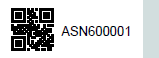
-
add another color bar (highlight color) to mark important docs
e.g. blue + red for important (long term storage) documents of person A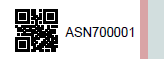
Example usage of ASN with colors:
| number ranges | Meaning | Color |
|---|---|---|
| 000000 | Me - normal docs (shorter term storage) | blue |
| 100000 | Me - imporatant / (long term storage) | blue/red |
| 200000 | Wife - normal | green |
| 300000 | Wife - important | green/red |
| 400000 | Child 1 - normal | yellow |
| 500000 | Child 1 - important | yellow/red |
| ... | ... | ... |
Getting started
You'll need Python 3 on your system.
To install all dependencies use
pip install -r requirements.txt
Usage
This tool is hightly flexible, almost all parameters can be controlled from the command line.
Other Avery (or competitor's) label sizes can be added to labelInfo in AveryLabels.py.
Usage: asn-gen.py [OPTIONS] [filename]

ASN Label Generator

Arguments:
  filename                          output filename of PDF file generated

Options:
  -l, --labeltype=STR               Type of label, e.g. 4731, get a list of supported labels with --labels (default: 4731)
  -n, --number=INT                  number of labels to generate (default: 189)
  -o, --offset=INT                  Number of labels to skip on the first sheet (e.g. already used) (default: 0)
  -d, --num-digits=INT              Number of digits for the ASN, e.g. 000001 (default: 6)
  -s, --first-asn=INT               First ASN to use, e.g. 100001 (default: 1)
  -f, --font-size=STR               Fontsize with a unit, e.g. 2mm, 0.4cm (default: 2mm)
  -q, --qr-size=FLOAT               Size of the QR-Code as percentage of the label hight (default: 0.9)
  -m, --qr-margin=STR               Margin around the QR-Code with a unit, e.g. 1mm (default: 1mm)
  --sub-labels-x, --lx=INT          How many labels to put on a phyical label horizontally (default: 1)
  --sub-labels-y, --ly=INT          How many labels to put on a phyical label vertically (default: 1)
  --debug                           enable debug mode
  --position-helper                 enable position helpers, e.g. as cutting guides when using sub labels
  --bar-width, --bw=INT             Show a colored bar on the right of the label (0 = no bar) (default: 0)
  --bar-color, --bc=STR             Color of the bar, HEX notation (default: d2dede)
  --highlight-bar-width, --hw=INT   add a colored highlight bar on the right of the label (0 = no bar) (default: 0)
  --highlight-bar-color, --hc=STR   Color of the highlight bar, HEX notation (default: d9a4a6)
  -p, --prefix=STR                  Prefix to the actual ASN number (default: ASN)

Other actions:
  -h, --help                        Show the help
  --labels                          Shows a list of supported labels
  --version                         Show the version
Testing your printer settings
Use --debug and --position-helper to test your printer settings.
Recommendation: do test prints on normal paper before printing to the actual label sheets.
Note: Make sure to set print size to 100%, not fit to page or similar.
Running the program
Depending on your configuration either use
./asn-gen.py ...
or
python3 asn-gen.py ...
Output Filename
If the filename is omitted the output defaults to
label-<labeltype>-<prefix>-<first-asn>-<first-asn+number>.pdf
e.g.
label-4731-ASN-000001-000190.pdf
Examples
List supported labels
To get a list of supported labels use
./asn-gen.py --labels
Currently: 3044, 4731, 5160, 5161, 5163, 5167, 5371, 4778, 100984
Simple 4731 label with color bars
To generate labels for a Avery L4731 sheet with a bar (blue) and a highlight bar (red) starting with ASN 700001 use:
./asn-gen.py --bw 8 --bc 0000ff --hw 3 --hc ff0000 -s 700001 out/labels-700001.pdf
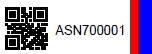
(I'd recommend using more pleasant colors for yourself ;) )
L5161 labels with multiple labels per physical label (cutting required)
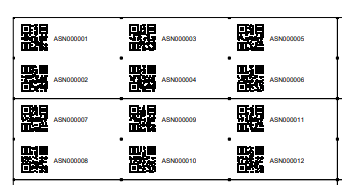
To generate labels for a 5161 sheets with 6 labels on one physical label (1 sheet with 120 ASN labels) use:
./asn-gen.py -l 5161 --lx 3 --ly 2 -n 20 --debug --position-helper
Recommendation: --position-helper will add small dots in the corners of (sub-)labels. This can be useful as subtle sublabel cutting guides.
--debug will show the box around the physical labels.
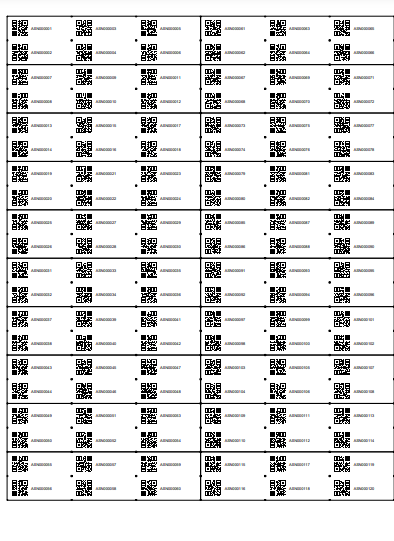
Output filename: label-5161-ASN-000001-000021.pdf
Credits
This project is based on work by gitolicious but was heavily modified to support CLI and some additional features. That project itself is based on the work from timrprobocom